


If you’re a student today, one thing is clear – data skills are no longer optional. Whether you’re studying commerce, business, finance, marketing, engineering, or IT, understanding data can give you a serious career advantage. That’s exactly where Tableau for students becomes important.
Tableau is one of the world’s leading data visualisation tools used by companies across finance, consulting, tech, marketing, and analytics. The best part? Tableau for students is free, and you can access professional-level tools at no cost.
You might have a lot of questions like:
→ How to access Tableau for students for free?
→ How to download Tableau Desktop for students?
→ How to get a student licence for Tableau?
→ How to do Tableau activation and installation?
→ What are the career benefits of learning Tableau?
Tableau for students is one of the most searched tools among college and university learners who want to build practical data science and analytics skills. If you’re looking for a Tableau free download for students, a student licence for Tableau, or a Tableau desktop for students download, this guide covers everything step-by-step so that you can start working on Tableau skills with clarity.
Did you know?
Tableau is used by over 100,000+ organisations worldwide, making it one of the most widely used data visualisation tools in the industry.
(Source: Tableau official blog – Our DataFam: Tableau in 2023 and Beyond )
Why Tableau for Students Matters Today
The job market has changed. Companies are not just hiring graduates; they’re hiring graduates with skills. One of the most in-demand skills right now is data visualisation.
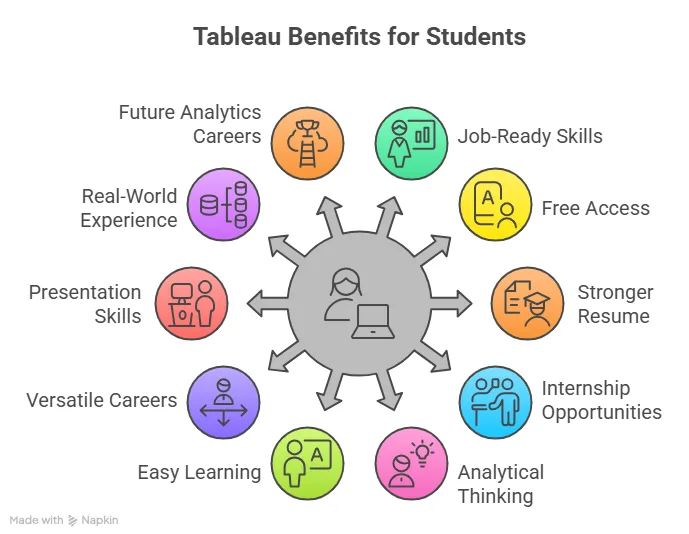
This is where Tableau for students makes a real difference. Tableau helps you:
- Turn data into dashboards.
- Create interactive reports.
- Analyse business trends.
- Present insights visually.
- Build strong project portfolios.
Students who learn Tableau early often find it easier to get internships in:
- Data science and analytics
- Finance
- Consulting
- Marketing analytics
- Business intelligence
Simply put, Tableau for students helps you move from theory to practical skills that employers value.
Is Tableau Free for Students?
Tableau for students is completely free through the official Tableau student licence program.
When you apply, you typically receive:
- Tableau Public access
- One-year free student licence
- Tableau activation key for students
This means the Tableau free version for students includes almost everything professionals use in real workplaces. The licence usually lasts for one year and can be renewed if you’re still enrolled as a student. So if you’re wondering about Tableau pricing for students, you can relax, as you get Tableau for students free access.
This quick video explains the top three skills that can help you get hired at leading consulting and professional services firms and how you can start building them while still in college.
What You Get With The Tableau Student Licence
Once your application is approved, Tableau for students gives you access to:
| Tool | What It Is Used For | How It Helps Students |
| Tableau Desktop | Data visualisation, dashboard creation, analytics projects, portfolio building. | Helps students create professional dashboards, work on real datasets, and build a strong analytics portfolio. |
| Tableau Prep | Data cleaning, data transformation, combining datasets, and preparing data for dashboards. | Allows students to clean and organise raw data before analysis, a key real-world data analytics skill. |
| Tableau Public | Publishing dashboards, building a portfolio, and sharing projects online. | Enables students to showcase projects online and create a public portfolio for internships and job opportunities. |
This complete package makes Tableau for college students extremely valuable for learning real-world analytics.
Also Read: Important Features of Tableau that every Beginner should know.
How to Get a Student Licence for Tableau for Students
The best part is that Tableau for students is that it’s available completely free through the official student licence programme. Once you register, you can download professional tools, practise on real datasets, and start building job-ready skills while you’re still in college.
Getting access to Tableau for students is easier than most people think. Tableau offers a dedicated student licence that provides full access to its core tools at no cost for eligible learners. Here’s the step-by-step process.
Step 1: Apply for a Tableau Student Licence
Start with the official Tableau student registration process.
You’ll need:
- College or university email ID
- Student ID card
- Proof of enrollment
This step is known as tableau registration for students.
Step 2: Verification Process
Once you apply:
- Tableau verifies your student status.
- Approval usually takes 1-3 days.
- You receive confirmation via email.
After approval, you’ll get:
- Tableau product key for students
- Tableau licence key for students
- Download instructions
This unlocks full Tableau for students free download access.
With this easy access, students don’t have to depend on short trial versions or outdated tools anymore. Instead, they can start using the same professional software that companies across the world rely on every day. This gives them the chance to work with real datasets, experiment with dashboards, and build practical analytics and visualisation skills while they’re still in college – not after they graduate.
This short video breaks down what data analysts actually do on a day-to-day basis, from analysing datasets and identifying trends to creating dashboards and helping companies make better decisions. Beyond dashboards and reports, the role is much more practical and business-focused than many students realise.
Tableau Desktop for Students Download: Step-by-Step
After receiving your licence, you can begin tableau desktop for Students download. Here’s the step-by-step guide:
- Open the approval email from Tableau.
- Click the Tableau desktop download link.
- Choose Windows or Tableau for Mac student version.
- Start the Tableau software download for students.
- Install the software.
- Enter the Tableau activation key for students.
- Complete activation.
Once done, your Tableau Desktop free for students is ready. This process usually takes less than 15 minutes.
From there, it becomes a hands-on learning experience. You can start playing around with datasets, creating basic charts, and slowly move on to building full dashboards. The more you use the software, the more comfortable you’ll become with working with data and presenting insights visually. It’s not just about learning a tool – it’s more about building practical skills.
How to Activate Tableau for Students
After installation, activation is quite simple. You just need to follow the steps:
- Open Tableau Desktop.
- Click “Activate Product”.
- Enter the Tableau licence key for students.
- Sign in with your student email.
- Finish activation.
Your Tableau for students licence will now be active for one year.
Also Read: The Easy Path To Building Tableau Projects That Actually Matter
Tableau Prep Download for Students
Many students only focus on Tableau Desktop, but Tableau Prep for students is equally useful.
Tableau Prep helps you:
- Clean messy data.
- Merge multiple datasets.
- Prepare data for dashboards.
- Handle real-world datasets.
To install:
- Use the same student licence email.
- Click the Tableau Prep download for students.
- Install and activate.
Both tools together make Tableau for students a complete analytics package, which enhances their data analysis skills.
Tableau Public for Students
If you’re just starting and don’t want to apply immediately, you can try using Tableau Public free download for students. This version is completely free, good for beginners, and great for portfolio building. However, these dashboards are public and offer limited privacy features. Still, many beginners start learning through Tableau Public before upgrading to a full Tableau for students licence.
Tableau Pricing for Students
One of the best things about Tableau for students is that pricing is not really a barrier. While Tableau can be quite expensive for professionals and businesses, students get access to most of its core features for free through the student licence.
| Version | Student Cost |
| Tableau Desktop | Free (1 year) |
| Tableau Prep | Free |
| Tableau Public | Free forever |
| Tableau certification | Paid (optional) |
If you’re thinking about building a career in analytics, one of the first questions you’ll probably ask is: Where do I even start? From understanding Excel and SQL to learning data visualisation tools like Tableau and building a strong portfolio, the video gives a step-by-step roadmap to becoming a data analyst in 2026.
Tableau for College Students: Career Benefits
Learning Tableau for students can significantly improve career opportunities.
Helps in internships
Many companies expect basic knowledge of:
- Excel
- SQL
- Tableau
Students who know Tableau concepts practically stand out instantly.
Strong portfolio building
You can create:
- Sales dashboards
- Financial reports
- Marketing analytics dashboards
- Business case projects
These projects make your resume stronger.
Useful for multiple careers
Tableau is useful for:
- Data analyst roles
- Business analyst roles
- Finance roles
- Marketing analytics
- Consulting
This makes Tableau for students valuable across industries.
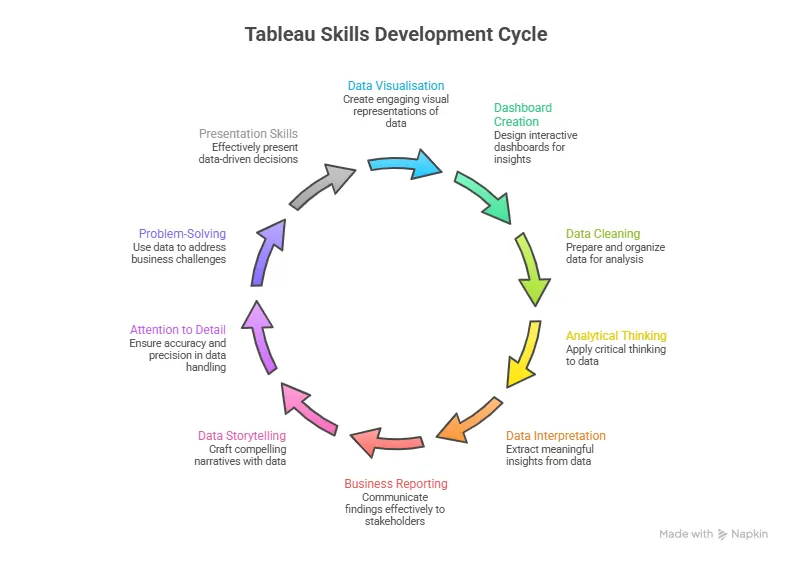
| Skills You Build with Tableau | How These Skills Help | Job Opportunities You Can Explore |
| Data visualisation | Learn to present complex data in simple visual formats like charts and dashboards | Data Analyst |
| Dashboard creation | Build interactive dashboards used in real business reporting | Business Analyst |
| Data cleaning & preparation | Understand how to organise and prepare raw data for analysis | Data Executive / MIS Executive |
| Analytical thinking | Identify trends, patterns, and insights from datasets | Junior Data Analyst |
| Reporting & storytelling | Present insights clearly for decision-making | Reporting Analyst |
| Portfolio development | Create real projects to showcase your skills to employers | Internships in data analytics, finance, and marketing analytics |
Recruiters often prefer candidates who can not only analyse data but also present insights clearly using dashboards and reports – making Tableau a valuable skill for students aiming for internships and placements.
Did you know?
According to industry hiring trends, data visualisation tools like Tableau consistently rank among the most in-demand skills for data analyst and business analyst roles. (Source: LinkedIn Workforce & Skills Reports)
Tableau Certification for Students
Once you’re comfortable with the software, you can consider Tableau certification.
Benefits include:
- Global recognition
- Resume credibility
- Better job opportunities
- Higher starting salaries
It also adds strong credibility to your resume. When recruiters see a Tableau certification, it signals that you don’t just know theory – you can actually work with data and create meaningful insights.
Certification can also open the door to better job opportunities. Many entry-level roles in data analytics, business analysis, and reporting prefer candidates who already know tools like Tableau. In some cases, it can even help you negotiate a better starting salary because you’re bringing a practical, in-demand skill to the table.
Adding a Tableau certification on top of that makes your profile even stronger, because it shows recruiters that your skills are recognised and you’re ready to use them in real work situations.
| Key Advantage | How Tableau Helps Students | Career Impact |
| In-demand skill | Learning Tableau helps students understand how to interpret and present data visually | Employers actively look for candidates who can work with data and dashboards |
| Practical exposure | Students work with real datasets, dashboards, and visual reports | Makes a strong impression during internships and campus placements |
| Builds confidence | Regular practice improves comfort with analytics tools and reporting | Helps students perform better in interviews and practical assignments |
| Real-world application | Apply classroom concepts to real business scenarios like sales, marketing, and finance analysis | Bridges the gap between theory and practical workplace skills |
| Strong analytical thinking | Encourages identifying trends, patterns, and insights from data | Prepares students for data-driven roles across industries |
| Better presentation skills | Teaches how to present insights clearly using dashboards and visuals | Useful for client presentations, reports, and corporate roles |
| Overall career readiness | Combines technical and analytical learning with hands-on projects | Gives students a clear career edge in analytics, business, and finance roles |
This video explains how students can move from zero technical knowledge to building expertise in data science and AI through structured learning and consistent practice.
Common Issues Students Face while working on Tableau
It’s quite normal to face a few minor issues when you’re applying for or setting up Tableau for the first time as a student. It can be slightly frustrating, but don’t worry – these are very common and usually easy to fix.
| Common Issue | What to Check | Simple Solution |
| Licence not approved | Student ID validity, correct college email, and clear documents | Make sure you upload a valid student ID, use your official college email, and submit clear, readable documents during the application. |
| Activation issues | Tableau product key, correct email, and internet connection | Double-check your Tableau student product key, ensure you’re using the same email used for registration, and stay connected to the internet during activation. |
| Installation errors | Storage space, system updates, and OS version | Ensure your laptop has enough storage, install the latest system updates, and download the correct version (Windows/Mac) for your device. |
Most Tableau for students issues get resolved quickly once these basic checks are done, so there’s usually no need to worry if you face a small delay.
Also Read: Steps to Create a Dashboard in Tableau
Tableau vs Other Visualisation Tools
When students start exploring data tools, one common question comes up: Should you learn Tableau, Power BI, Excel, or something else? Here’s a comparison that can help you make a mindful decision.
| Features / Factors | Tableau | Power BI | Excel | Google Data Studio |
| Easy for beginners | ✅ | ✅ | ✅ | ✅ |
| Advanced visualisations | ✅ | ✅ | ❌ | ❌ |
| Interactive dashboards | ✅ | ✅ | ❌ | ✅ |
| Strong for portfolio building | ✅ | ✅ | ❌ | ❌ |
| Used widely by global companies | ✅ | ✅ | ✅ | ❌ |
| Best for data storytelling | ✅ | ❌ | ❌ | ❌ |
| Student-friendly learning resources | ✅ | ✅ | ✅ | ✅ |
| Ideal for analytics careers | ✅ | ✅ | ❌ | ❌ |
Tableau for students often stands out because of how easy it is to use and how powerful the visualisations look. It allows you to turn raw data into interactive dashboards without needing heavy coding skills.
Preparing for a data science or analytics role can feel overwhelming. This video gives a practical look at the most common data science interview questions and what recruiters are really trying to assess when they ask them.
Why Learn Tableau with Imarticus
If you’re serious about building a career in analytics or finance, learning Tableau through structured guidance like the postgraduate program in data science and analytics can make a big difference.
Imarticus Learning helps students go beyond basic software knowledge and focuses on practical application. Instead of only learning how the tool works, students understand how Tableau is used in real business environments.
Key advantages include:
- Industry-aligned curriculum with real datasets
- Hands-on dashboard and portfolio building
- Guidance from experienced faculty
- Placement-focused training approach
- Internship and placement opportunities
- Exposure to analytics and finance career paths
If you want to go beyond just learning Tableau and actually use it in your career, the right kind of structured training can really help.
FAQs About Tableau for Students
If you’re exploring Tableau for the first time, from downloading the software and getting a student licence to understanding whether it actually helps with internships or jobs, most students want clarity before getting started. To make things easier, here are answers to some of the most frequently asked questions about Tableau for students to get started.
Is Tableau good for beginners?
Yes. Tableau for students is actually one of the easiest analytics tools to start with. It uses a drag-and-drop interface, visual dashboards, simple chart creation, and interactive reports. Even students with no coding background can learn it. Once you’ve built dashboards and worked on projects, preparing for certification becomes much easier.
Is Tableau free for students?
Yes, Tableau for students is available free through the official student licence programme. Eligible students can access Tableau Desktop and other tools at no cost for one year.
How can I download Tableau for students for free?
You need to apply for a Tableau student licence using your university email ID and proof of enrolment. Once approved, you can complete the Tableau for students free download and installation.
What do I get with the Tableau student licence?
The Tableau for students licence typically includes Tableau Desktop, Tableau Prep, and Tableau Public access, along with a one-year activation key. Most Tableau for students licences are valid for one year. If you’re still enrolled, you can renew the licence.
Can I use Tableau on a Mac as a student?
Yes, Tableau for students supports both Windows and Mac devices. You can choose the correct version during download according to your device and operating system.
Is Tableau useful for non-technical students?
Absolutely. Tableau for students is widely used in finance, marketing, business, and consulting roles, not just technical careers. Even students without coding knowledge can learn it.
Can learning Tableau help me get internships?
Yes. Many companies prefer candidates who understand data tools. Knowing Tableau for students can improve internship and placement opportunities. Companies like Deloitte, EY, KPMG, PwC, Accenture, JP Morgan, Infosys, Wipro and TCS regularly hire interns for roles in data analytics, business analysis, reporting, and consulting.
Is Tableau certification worth it for students?
Tableau certification can strengthen your CV and improve job prospects. Many students choose to go for certification after practising with the Tableau for students free licence for a few months. A Tableau certification can help with a stronger resume and LinkedIn profile, better internship opportunities, higher confidence during interviews, and improved job prospects in analytics roles.
Getting Started with Tableau for Students
Let’s be honest – today’s job market is competitive, and just having a degree is often not enough. What really helps is having practical skills you can actually show. Tableau for students gives you a simple way to start building those skills early, while you’re still in college and exploring your career options.
Whether you’re interested in analytics, finance, consulting, or marketing, knowing how to work with data and present it clearly always gives you an edge. Since students get access to Tableau for free, you can start working with datasets, create basic dashboards, and slowly build projects of your own.
The biggest advantage of starting early is confidence. When you spend time practising and experimenting, you stop feeling like a beginner. By the time internships or placements come around, you already have something to show – not just theory, but actual work you’ve done.
If you want structured guidance and real-world projects, a specialised postgraduate program in data science and analytics can help you move faster and build confidence.