Excel for Data Analysis: Skills, Formulas, Careers & Learning Path

If you’ve ever worked with numbers, even briefly, you’ve probably used Excel for data analysis. And if you’ve ever thought, I should really be better at this, you’re not alone.

Excel is one of those skills that quietly sits behind countless business decisions. Excel might not have the shine of the newest analytics tools, but don’t be fooled – it’s one of the most powerful, practical, and relevant tools you can learn.  

Before data reaches those sleek dashboards, machine learning models, or modern BI platforms, it almost always passes through one place first – Excel.  

As the demand for data skills continues to grow, many learners are turning to structured programs like the Data Science & Analytics Course, where Excel is taught from the ground up – not just as a spreadsheet tool, but as a powerful platform for real-world data analysis.

In this guide, I’ll walk you through everything you should know about Excel for Data Analysis, from organising data in Excel to advanced formulas, real-world applications, time-saving tricks, and even how professional training programs can boost your analytics career.


Quick fact:

According to multiple industry surveys, Excel remains one of the top three most-used tools for data analysis and reporting in business environments, especially in finance, operations, and marketing roles.


Why Excel for Data Analysis Still Matters

You might be wondering: in a world of Python, SQL, and business intelligence tools, is Excel still relevant?

The short answer: absolutely.

Excel is universal. Almost every company, big or small, uses Excel in some form, regardless of size or industry. Even when they have data scientists and analytics platforms, data often lands in Excel first to clean, explore, and validate before moving into advanced systems.

In most real-world workflows, datasets don’t jump straight into analytics platforms. They’re first cleaned, checked, explored, and validated in Excel. That’s where initial insights are formed, and early decisions are made.

Here’s why Excel for data analysis continues to dominate:

  • It’s widely available and easy to learn, even for non-technical users.
  • It supports quick exploratory analysis without setup or coding.
  • It integrates with databases, dashboards, and reporting tools.
  • It fits into real business workflows – from finance and marketing to operations.
  • It works with both simple and advanced analysis without needing programming.
  • It allows both simple and advanced analysis in the same environment.

For beginners, Excel builds analytical thinking step by step – from basic summaries to complex models and lets you communicate insights in an intuitive format. You don’t start by making complex dashboards. You start by understanding numbers. Then you begin to spot patterns. And eventually, you learn how to turn those patterns into better decisions. That’s how Excel grows with you.

For professionals, advanced Excel techniques do more than just look impressive – they save time, improve accuracy, and cut down the kind of manual work that slows you down every day.


How to Organise Data in Excel for Analysis

Before formulas or dashboards, data organisation is critical. Poorly structured data leads to incorrect analysis, no matter how advanced your formulas are.

Best Practices to Organise Data

If you’re learning how to organise data in Excel for analysis, follow these rules:

  • One column = one variable  – Start with a simple rule: one column should represent one variable. Example: Date, Product Name, Revenue, Region should each have their own column.
  • No merged cells – Avoid merged cells. Merged cells break formulas, pivot tables, and automation.
  • Consistent data types – Dates as dates, numbers as numbers, text as text. Mixing formats may look fine visually, but it causes problems when you apply Excel functions for data analysis.
  • Headers in the first row – Clear column headers are essential for analysis.
  • No blank rows or columns – Especially in the middle of your dataset.
Enhancing Excel Data with Effective Analysis

This structured approach ensures Excel functions for data analysis work correctly and efficiently.


Who Should Learn Excel for Data Analysis?

Excel is not limited to analysts or data specialists. In reality, it’s useful across almost every role.

Excel is valuable across roles:

RoleHow Excel Is Used in Real Life
Students and fresh graduatesLearn how to work with data, build basic reports, analyse assignments, and develop problem-solving skills that employers expect from day one. Excel helps bridge the gap between academic knowledge and real-world work.
Business analystsClean and organise raw data, perform exploratory analysis, create pivot tables, and turn numbers into insights that support business decisions and strategy discussions.
Finance and accounting professionalsManage budgets, track expenses, build financial models, reconcile accounts, and automate recurring reports to improve accuracy and save time.
Marketing analystsAnalyse campaign performance, track conversions and ROI, segment customers, and spot trends in customer behaviour using dashboards and data summaries.
Operations managersMonitor KPIs, track inventory and supply chains, analyse process efficiency, and identify bottlenecks to improve day-to-day operations.

If your role involves numbers, reports, or decisions, Excel skills are essential.


Industry insight:

Job listings for roles like Business Analyst, Financial Analyst, and Operations Analyst frequently list Excel as a mandatory or preferred skill, even when advanced tools like SQL or Python are also mentioned.


Advanced Excel Formulas for Data Analysis

Once you’re comfortable with the basics, it’s time to explore advanced Excel formulas for data analysis.

Examples of Advanced Formulas

  • Nested IF statements – for multi-condition logic
  • Array formulas – to calculate across dynamic ranges
  • Dynamic ranges using OFFSET – for flexible data sets
  • SUMPRODUCT – for weighted calculations
  • Logical combinations with AND/OR – for decision logic
  • Advanced lookups with INDEX + MATCH – more accurate than basic lookups

These formulas allow you to handle scenarios like:

  • Multi-condition analysis
  • Weighted averages
  • Dynamic and scalable reporting

If you’re serious about Excel for data analysis, these formulas are non-negotiable.
Excel Techniques for Data Analysis Beyond Formulas

Practical reality:

In many organisations, complex business logic is still handled directly in Excel using advanced formulas – long before automation or coding solutions are introduced.


Excel Functions Used for Data Analysis in Real Projects

In real projects, Excel functions are rarely used in isolation. Analysts combine multiple functions to solve practical problems efficiently.

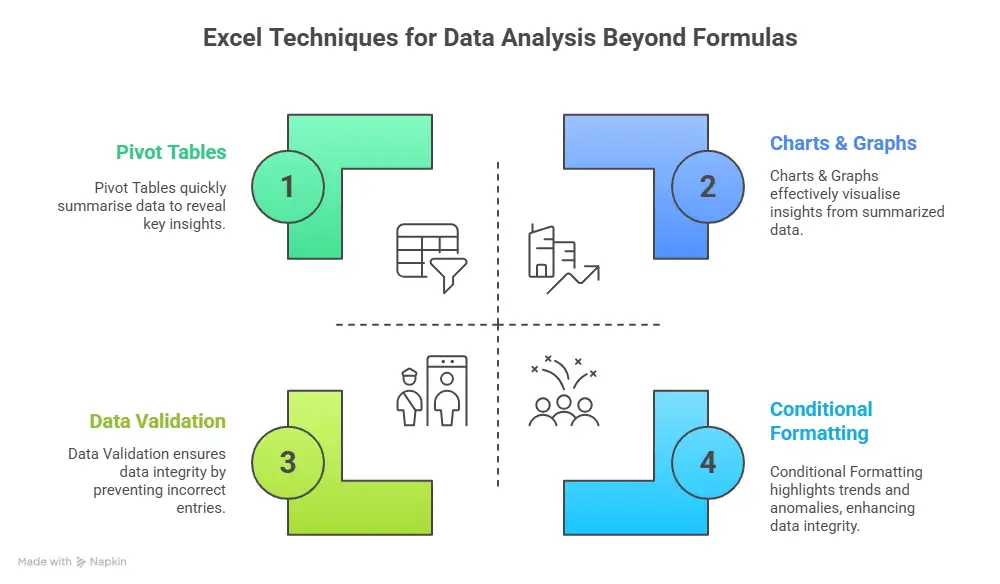
For example, IF, combined with COUNTIF, helps validate data and flag issues early. INDEX, MATCH, and IFERROR together create robust lookup systems that don’t break when data changes. SUMIFS allows you to aggregate data based on multiple conditions – something that comes up constantly in business analysis.

These Excel functions for data analysis help turn raw datasets into decision-ready insights.

Common Function Combinations:

  • IF + COUNTIF for data validation and quality checks.
  • INDEX + MATCH + IFERROR for robust, error-resistant lookups.
  • SUMIFS for aggregating sales or metrics by many multi-criteria conditions.

These combinations of Excel functions for data analysis help transform raw data into decision-ready insights that business leaders can trust.

Excel Tricks for Data Analysis That Save Time

Efficiency matters in analytics. When you work with data regularly, speed matters. The right Excel tricks can significantly improve productivity and accuracy.

Useful Shortcut for Data Analysis in Excel

Simple shortcuts – like converting data into tables, applying filters instantly, or inserting pivot tables quickly – can save hours over time.

  • Ctrl + T → Convert data to a table.
  • Alt + = → AutoSum
  • Ctrl + Shift + L → Filters
  • Alt + N + V → Insert Pivot Table
  • Ctrl + Arrow Keys → Navigate large datasets

Using the right shortcut for data analysis in Excel can save hours every week.

Excel Macros for Data Analysis and Automation

As your work becomes more repetitive, manual effort starts slowing you down. That’s where Excel macros for data analysis become valuable. 

Macros allow you to automate repetitive reports, clean and format data automatically, apply formulas and charts consistently, and reduce human errors.  While macros require some learning, they significantly enhance Excel techniques for data analysis in large workflows.

For professionals handling recurring reports or large datasets, macros are a powerful addition to Excel techniques for data analysis.


Did you know that even basic Excel automation can reduce repetitive reporting time by 30-50%, especially in roles involving weekly or monthly reports.


Learn Excel for Data Analysis: Free vs Structured Learning

Many beginners search for ways to learn Excel for data analysis for free, and while free resources are useful, they often lack structure.

  • Free Learning Resources
  • YouTube tutorials
  • Excel practice files
  • Blogs and forums
  • Sample data for Excel analysis

These help you get started, but they usually don’t offer a clear progression path.

Sample Excel Data for Analysis: The Right Way to Practice

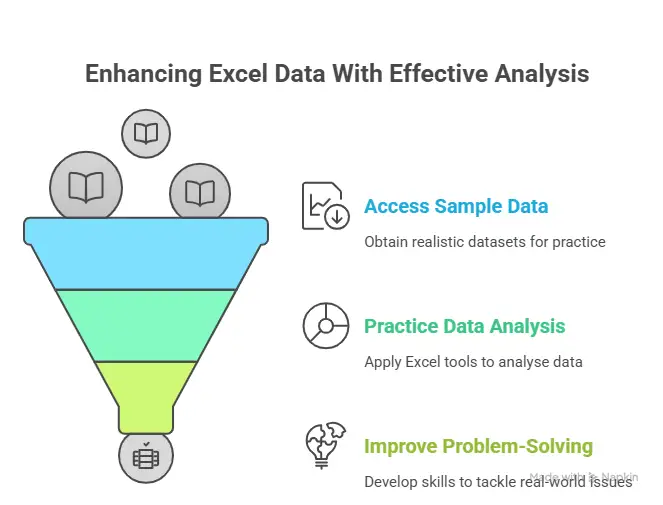
The fastest way to learn Excel for data analysis is by working with real-world datasets. Theory alone doesn’t prepare you for messy, incomplete, or inconsistent data – something every analyst deals with daily.

Using sample Excel data for analysis helps you practice cleaning, organising, and interpreting information or visualisation. Sales data, employee records, finance sheets, and marketing performance data are all excellent examples of sample data for Excel analysis.

The more realistic your practice data is, the stronger your Excel problem-solving skills become.


Excel Formulas for Data Analysis: Building Analytical Thinking

Excel formulas for data analysis form the foundation of all analytical work in Excel. Basic formulas like SUM, AVERAGE, COUNT, and IF help you understand what your data is doing and why.

Over time, as you gain confidence, formulas stop feeling technical and start feeling logical. Instead of memorising syntax, you focus on answering questions – totals, trends, comparisons, and exceptions.

This shift is what turns Excel from a calculation tool into a true analysis tool.

Formulas for Data Analysis in Excel: Real-World Applications

Excel formulas aren’t academic – they’re practical tools used daily in business.

Use CaseHow Excel Is Used in Practice
Sales performance trackingTrack individual and team sales, compare targets vs actuals, identify top-performing products or regions, and spot trends over time using charts and pivot tables.
Budget vs actual analysisCompare planned budgets with real spending, highlight variances, control costs, and support better financial decision-making through structured reports.
Financial forecastingAnalyse historical data to project future revenue, expenses, or demand, helping teams plan resources and set realistic business targets.
HR attrition analysisMonitor employee turnover, identify patterns by department or tenure, and uncover potential retention issues before they impact the business.
Marketing campaign evaluationMeasure campaign performance across channels, track conversions and ROI, and understand what’s working (and what isn’t) to optimise future campaigns.

These real-world applications reinforce why Excel for data analysis remains indispensable.


Excel for Data Analysis vs Other Tools

Excel is often compared with Python, SQL, and BI tools. Each comes with its features and benefits.

Excel stands out for quick analysis, small to medium datasets, ad-hoc reporting, and business-friendly workflows. Rather than replacing other tools, Excel for data analysis often complements them.

For many professionals, Excel is the bridge between raw data and advanced analytics.

CriteriaExcelPythonSQL
Beginner-friendly & No coding required
Quick ad-hoc analysis & Immediate visual feedback
Ideal for small to medium datasets
Business-friendly interface
Fast reporting & presentations
Advanced automation & ML
Handling very large datasets

Important Excel Functions for Data Analysis You’ll Use Every Day

Most analysts rely on a handful of functions again and again. These include:

  • XLOOKUP – for flexible lookups
  • IFERROR – to handle exceptions
  • TEXT functions (LEFT, RIGHT, MID) – for text clean-up
  • Logical operators – for decision logic

These Excel functions for data analysis make your workflows cleaner, logic stronger, and outputs more reliable.

These Excel functions used for data analysis are not “advanced” because they’re complex – they’re advanced because they solve real business problems efficiently. Once mastered, they dramatically reduce manual effort and mistakes.


Real-world workflow:

In practice, Excel is rarely replaced outright. Instead, it acts as the bridge between raw data sources like SQL databases and advanced analytics or BI dashboards.


Excel for Data Analysis in Real Careers

Excel skills are expected across roles, even when they’re not explicitly mentioned in job descriptions. Finance teams use Excel for budget forecasting and analysis. Marketing teams track campaign performance and ROI. Operations teams rely on Excel to measure efficiency and cost.

Because Excel for data analysis is used everywhere, it offers strong career flexibility. The same skill set applies across industries, functions, and experience levels. This is what makes Excel such a reliable long-term skill.

Excel Career RolesReal-World Use of Excel
Financial AnalystBudgeting, forecasting, and financial reporting
Business AnalystData analysis, pivot tables, and dashboards
Marketing AnalystCampaign tracking, ROI analysis
Operations ManagerKPI tracking, cost and efficiency analysis
HR AnalystAttrition and workforce analysis
Sales AnalystSales tracking and revenue forecasting

(Source: Naukri, Indeed, LinkedIn)


Career trend:

Many professionals working in analytics roles today began with Excel and later expanded into tools like SQL, Python, and Power BI – making Excel a common entry point into data careers.


Why Learn Excel for Data Analysis with Imarticus Learning

If you’re serious about moving beyond basic spreadsheets and using data the way businesses actually do, structured training can make a real difference. Learning on your own works up to a point – but guidance, practice, and real-world context are what help skills stick.

Programs like the Postgraduate Program in Data Science & Analytics by Imarticus Learning are designed with this in mind. Instead of teaching tools in isolation, the curriculum shows you how Excel fits into the larger analytics workflow. You learn how to move from spreadsheets to databases, code, and dashboards – just like in real roles.

Here’s what you’ll work with:

  • Excel for data analysis and reporting.
  • SQL for querying and managing data.
  • Python for analytics and automation.
  • Statistical modelling and machine learning.
  • Power BI and Tableau for visualisation.

This project-driven program lets you work with real datasets using Excel, SQL, Python, Tableau, and Power BI – so the skills you build are practical and job-ready. You also get interview preparation and career support to help you apply what you’ve learned with confidence.

Take the next confident step with the Postgraduate Program in Data Science and Analytics, where Excel for data analysis becomes your starting point and a powerful foundation for growing into advanced analytics roles.


FAQs About Excel for Data Analysis

If you’re learning Excel for data analysis, you might still have doubts about formulas, shortcuts, courses, or how Excel fits into real analytics careers. These frequently asked questions guide you, so you can spend less time searching and more time using Excel with confidence.

What are the most important Excel functions for data analysis?

You don’t need to learn every Excel function to be effective. Most people rely on a core set – functions like SUM, AVERAGE, IF, COUNTIF, SUMIF, XLOOKUP, INDEX, MATCH, and IFERROR. These cover the majority of real-world data analysis tasks and form the backbone of everyday Excel work.

What are the 4 types of data analysis?

The four most common types of data analysis are:

  • Descriptive – what happened
  • Diagnostic – why it happened
  • Predictive – what might happen next
  • Prescriptive – what should be done

Excel for data analysis is especially strong in descriptive and diagnostic analysis, and often supports predictive analysis through trends and forecasting.

Are there Excel for data analysis books or PDFs?

Yes, there are several Excel for data analysis books and PDFs available that explain formulas, functions, and case studies. These are excellent reference materials, especially when paired with hands-on practice.

Is there an Excel for data analysis free course with a certificate?

Some platforms offer free Excel for data analysis courses with certificates, usually as introductory programs. These help get started, but advanced roles typically require deeper, practical experience beyond certificates. Imarticus Learning teaches Excel for data analysis as part of a broader, industry-aligned analytics curriculum. Opting for such courses is better as they focus beyond formulas, the program emphasises real projects, practical application, and career-ready skills – helping learners move from basic Excel knowledge to confident analytics professionals.

How is Excel used for data analysis?

From calculating totals and comparing performance to creating charts, reports, and pivot tables, Excel helps turn raw data into clear insights. In most workplaces, it’s the first tool people use for analysis before moving to more advanced platforms.  

Can Excel handle large datasets for data analysis?

Excel works very well for small to medium-sized datasets and is widely used for exploration, reporting, and validation. For extremely large datasets, tools like SQL or Python may be more efficient, but Excel is often still used to review and present the results.

What Excel skills do employers actually look for?

Employers usually care less about how many formulas you know and a lot more about what you can do with data. Skills like data cleaning, logical formulas, pivot tables, lookups, and clear reporting are highly valued. Being able to explain insights clearly is just as important.


Excel for Data Analysis: Your Next Smart Career Move

Excel may not always be the most talked-about tool, but it’s often the one doing the most work behind the scenes.

Excel for data analysis isn’t just a beginner skill – it’s a career skill that stays relevant as you grow. It helps you move from working with numbers to understanding them, from following reports to driving decisions. Whether you’re analysing sales, tracking performance, or preparing for a larger role in analytics, Excel gives you a solid, reliable foundation.

If you’re at a stage where you don’t just want to learn anymore – but actually want to use what you know in real situations – this is where having structure really matters. With the right guidance, supportive mentors, and hands-on practice, Excel stops feeling like just another tool and starts becoming your gateway into the wider world of data analytics.

That’s exactly where the Postgraduate Program in Data Science and Analytics from Imarticus Learning comes in. Excel is taught as part of a complete, industry-aligned journey, which means you’re not just ticking off concepts or memorising formulas.

Start today, and let Excel become the foundation that supports and grows your analytics career over time.

Python for Data Science: Made Easy for Complete Beginners

Python for data science is the one skill I always recommend for anyone aiming to unlock the value of data, no matter their prior coding experience.

Today, Python powers everything – from Netflix recommendations to NASA’s spacecraft data. According to the JetBrains Developer Ecosystem Report 2024, more than half of data scientists use Python every day. And it’s not just for hardcore programmers – whether you’re a marketer digging into campaign results, a finance professional automating reports, or a student taking your first steps into tech, Python fits naturally into what you do.

With its readable syntax, vast ecosystem of libraries, and dominance in analytics, Python for data science is now the backbone of industry data science platforms, powering decision-making from healthcare to finance.

In finance, data science generates up to £1.02 trillion in annual savings; in manufacturing, maintenance costs decrease by 40%. Recent surveys show 66% of data scientists use Python regularly, and the language is the primary platform in data analytics and AI applications worldwide.

As this demand continues to grow, many learners choose structured learning paths such as a Postgraduate Program in Data Science & Analytics, where Python is taught from scratch and applied to real business problems rather than just theory.

In this guide, I’ll break down how to learn Python for data science step by step – even if you’ve never written a line of code in your life.


Fact!

Python for data science refers to using Python to collect, clean, analyse, visualise, and model data using libraries like Pandas, NumPy, Matplotlib, and Scikit-learn.


Why Python is the Data Science Leader

In 2025, Python continues to lead the way in data analysis and machine learning, staying ahead of alternatives like R and JavaScript. This shift comes down to several factors:

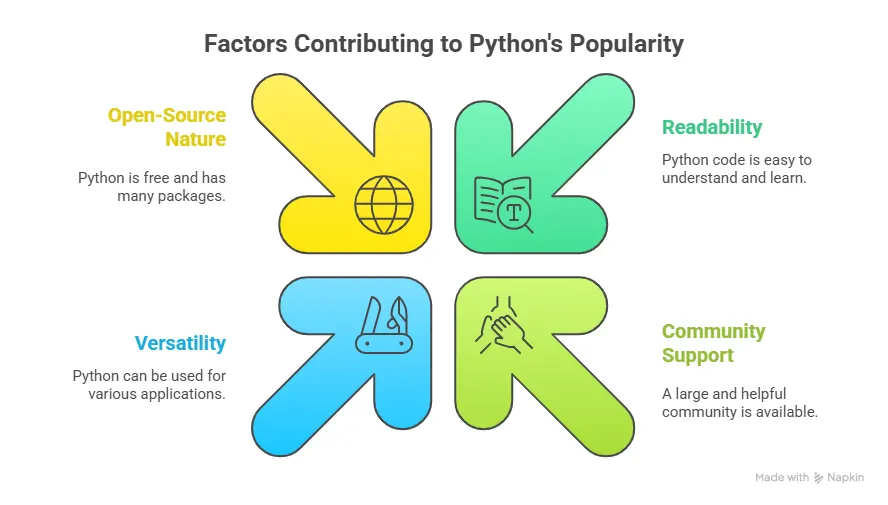
  • Readability: As Jake VanderPlas writes in the Python Data Science Handbook, “Python code reads like plain English.” Even model training routines can be understood at a glance.
  • Versatility: Python is “accessible enough for non-engineers, but powerful enough for production-grade pipelines”- a sentiment echoed by countless educators and professionals.
  • Industry Use: According to KDNuggets,  over 51% of Python users focus specifically on data exploration, ETL (extract, transform, load), modelling, and real-time analysis.

The most essential Python tools for data KDNuggets include Python libraries for data science:

Python LibraryMain UseBeginner- Friendly?ML Support?Leading Tutorials
PandasData cleaning & analysisYesYesYes
NumPyNumerical computationYesYesYes
MatplotlibData VisualisationYesIndirectYes
Scikit-learnMachine Learning modelsModerateYesYes
TensorFlowDeep learning & AIAdvancedYesYes

Together, these tools support everything from simple spreadsheet analysis to advanced AI systems. 


Did you know?
Platforms built around Python are expected to grow from $150.2 billion in 2024 to $174.1 billion in 2025, and the global big data analytics market is projected to reach $103 billion by 2027.


Why Python Is Perfect for Beginners

If programming languages were cars, Python would be the automatic – smooth, forgiving, and easy to drive. 

Factors Contributing to Python's Popularity

Major companies such as Google, Netflix, and NASA rely heavily on Python for data science because it scales easily and integrates seamlessly with modern technologies. 

According to the Stack Overflow Developer Survey 2024, Python remains the world’s most desired programming language – a clear signal that it’s both accessible and valuable for professionals across domains.

Popular Python packages for data science include Pandas, NumPy, Scikit-learn, TensorFlow, and PyTorch. Together, these libraries form the core Python frameworks for data science and machine learning, used in both research and production environments.

In short: Python is the Lego of programming – small, colourful, and endlessly customisable.


How Python Skills Can Boost Your Career

Let’s be honest – most of us don’t learn Python just for fun. We do it because it leads somewhere, especially into fast-growing fields like Python for data science, analytics, and AI. And the good news is that ‘somewhere’ can be almost anywhere.

Here’s how it changes the game in different fields:

IndustryHow Python HelpsExample
Finance & BankingAutomate financial reports, forecast trends, analyse risk, and perform real-time fraud detection.Analysts use Python to build stock prediction models.
MarketingTrack campaign data, analyse customer sentiment.Marketers scrape social media data to measure brand mentions.
HealthcareIt powers advanced medical image analysis and patient risk prediction to optimise hospital operations.Python models help detect disease patterns.
E-commercePersonalise product recommendations.Amazon uses Python for recommendation algorithms.
RetailPredicts supply chain needs.Retailers use Python to forecast product demand and reduce stockouts.
EducationBuild adaptive learning tools.EdTech companies use Python for AI-based tutoring apps.

A 2025 LinkedIn Workforce Report revealed that professionals with Python and data analysis skills earn up to 22% more than peers in the same roles.

So, whether you’re trying to automate daily tasks or transition into a tech-focused role, Python doesn’t just add a skill – it opens a door.

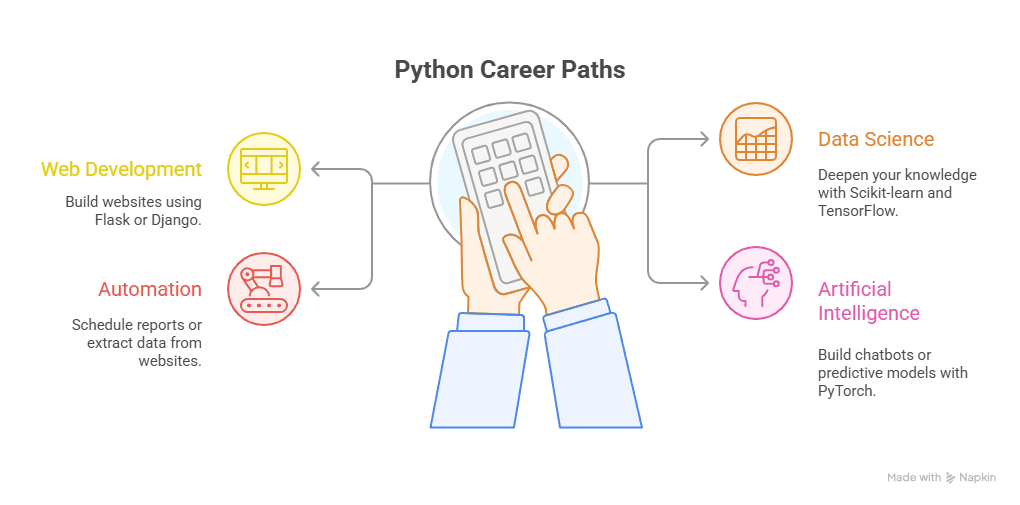
Python Career Paths

Did You Know? Learning Python programming for data science and machine learning builds skills that apply across analytics, AI, and automation roles.


Step-by-Step Guide on How to Learn Python for Data Science

Here’s a clear and practical five-step roadmap for anyone wondering how to start – even without a tech background.

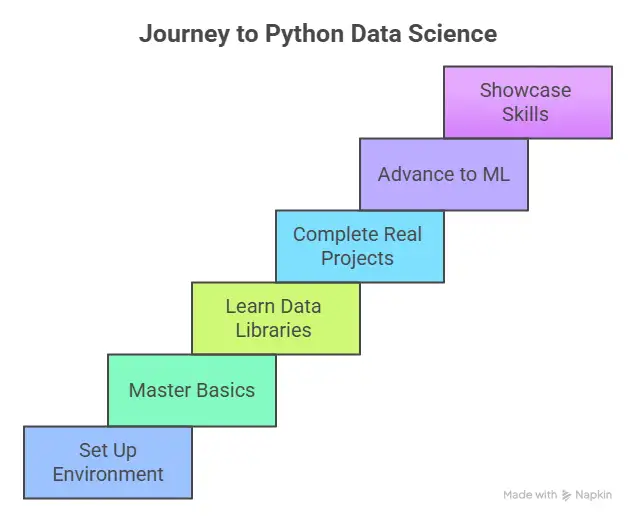
Step 1: Start with Python Basics

Before diving into big data or machine learning, or Python for data science workflows, start small. The Python basics – variables, data types, loops, and conditions – form the foundation of every project you’ll ever build.

Imagine writing a grocery list, now imagine doing it in Python. Instead of scribbling items on paper, you create a list that you can easily update, sort, or reuse. It’s a small task, but it shows how Python turns everyday tasks into something fun and surprisingly powerful.

Groceries = [“milk”, “bread”, “eggs”]

For item in groceries:

    print(item)

That’s Python in action. This line simply means:

👉 Create a list called groceries and put three items in it.

If you spend just 20-30 minutes a day learning concepts like data types (numbers, strings, lists), conditional statements (if, else, elif), loops (for, while), functions and indentation. 

Step 2: Practice with Small Python Projects

Theory without practice is like reading about swimming and never touching the water.

According to Harvard’s Learning Science Lab (2024), micro-projects and short learning bursts improve coding skill retention by up to 60% compared to reading tutorials alone.

Try building simple Python projects such as:

  • Expense / Habit Tracker: log your daily spending, record workouts or reading habits.
  • Weather App: fetch live weather data using an API.

Each project teaches you how to debug, think logically, and apply Python for data science fundamentals in the real world. 

Step 3: Explore Popular Python Libraries

Once you’re comfortable writing scripts, it’s time to meet your secret weapons: Python libraries for data science. These are pre-built toolkits that make Python for data science work easier – the real reason Python is so powerful.

Here are some essential libraries to explore:

  • NumPy: for mathematical operations and numerical data. Think of it as a calculator on steroids.
  • Pandas: for working with spreadsheets, CSVs, and large data sets – your Excel replacement.
  • Matplotlib: for data visualisation; helps turn rows of numbers into meaningful charts.
  • Seaborn: an extension of Matplotlib, perfect for clean, attractive visualisations.

According to the Kaggle State of Data Science Report (2024), over 80% of data professionals use Pandas and NumPy daily.

You can practise by:

  • Cleaning messy data in Excel using Pandas
  • Plotting sales or website traffic with Matplotlib
  • Summarising survey data with NumPy arrays

Understanding these libraries is like learning shortcuts that professionals use to save hours every day.

Step 4: Learn Python for Data Science

Once you’re confident with the basics and libraries, it’s time to understand how Python powers data science – one of today’s fastest-growing fields.

Data science combines statistics, visualisation, and machine learning to uncover insights from raw data – and Python makes all of this surprisingly beginner-friendly.

You’ll use:

  • Pandas and NumPy for data cleaning and manipulation.
  • Matplotlib and Seaborn for charts and visualisations.
  • Scikit-learn for machine learning algorithms.

According to IBM SkillsBuild (2025), there’s been a 40% surge in demand for Python-based data roles in India alone.

If you enjoy storytelling through data, this is your domain. Start with analysing open datasets from Kaggle or Google Colab, and try to answer questions like:  “Do people spend more online on weekends?”

Python gives you the tools to find the answers.

Step 5: Build a Portfolio with Real-World Python Projects

Your Python learning journey isn’t complete until you can showcase what you’ve built. A portfolio proves to employers that you can apply what you’ve learned.

Post your projects on GitHub or share interactive notebooks via Kaggle. Start with small but impactful ideas:

  • Movie Recommendation System using basic data filtering.
  • Fake News Detection Tool using text processing.
  • Resume Shortlisting Script that scans CVs for keywords.

Working on Python projects for data science helps beginners apply concepts in real-world scenarios. Common beginner-friendly projects include data analysis dashboards, recommendation systems, and machine learning models built using Python.

Employers value proof of Python for data science skills more than certificates. A well-documented GitHub repository often says more than a résumé. Each completed project adds to your confidence and credibility.

Journey to Python Data Science

Research from MIT Open Learning (2023) found that adults retain up to 70% more technical information when they apply concepts immediately through projects rather than passive reading.

Remember: your goal isn’t perfection – it’s progress.


Fact!

90% of enterprises deem data science essential for success, and 65% consider it crucial for decisions.


How Long Does It Take to Learn Python?

This is one of the most-searched questions online – “How many days to learn Python?” The honest answer: it depends on your pace, goals, and consistency.

Here’s a realistic roadmap:

StageFocusAverage Duration 
Month 1Learn Python basics30 days
Months 2-3Practise small projects60 days
Months 4-6Master libraries & build a portfolio90 days

For complete beginners, one hour a day is enough to build confidence in Python for data science. Remember, consistency trumps intensity. A little progress every day adds up quickly.

Here’s a smarter approach:

  • Learn from Mentors: Guidance matters. Having experts to review your code and projects drastically speeds up your progress. You learn to avoid bad habits early and think like a professional.
  • Work on Real Data: Learning Python from real datasets (finance, retail, healthcare) gives your practice meaning and helps you relate theory to your field.
  • Learn with Structure: Random YouTube tutorials can help, but they often skip the context needed for Python for data science. Structured courses – like the ones by Imarticus Learning – follow a curated roadmap that builds your skills in the right sequence.
  • Join a Community: Collaborating with peers keeps you accountable. Sharing code, asking questions, and building together mirrors real-world teamwork.
  • Track Your Growth: Document everything you build – even small scripts. When you look back, you’ll see how far you’ve come, which is the best motivation to keep going.

The industry is evolving incredibly fast, thus increasing the demand for experienced, skilled technical professionals. What tech professionals or even beginners need is to build the skills they need to succeed. If you prefer a guided, outcome-focused path, check out the Postgraduate Program in Data Science and Analytics with GenAI – where Python is taught from scratch with real-world business applications, mentorship, and placement support. It also provides 100% job assurance, hands-on projects, and access to GenAI-powered tools.


💡 Pro Tip: Combine free resources with accountability. Set a weekly goal or join a learning community – it keeps you consistent and motivated.


Expert Tips about Learning Python for Data Science

Even the best learners stumble. Here are four common traps beginners fall into in Python for data science – and how to sidestep them.

Focusing Too Much on Syntax: You don’t need to memorise every command. Understanding why the code works matters more than knowing what it says.

Ignoring Python Libraries Early On: Libraries save time and help you think like a professional. Don’t wait until you’re “advanced” – start using Pandas and Matplotlib early.

Not Building Projects: Tutorials feel safe, but real learning happens when you apply your knowledge. Projects create context and reveal gaps in understanding Python for data science concepts.

Giving Up Too Soon: Consistency is the secret ingredient. As James Clear writes in Atomic Habits, “Every action you take is a vote for the person you wish to become.”

So, write one more script. Fix one more error. That’s how mastery happens – one line of code at a time.

Here’s a quick snapshot of the framework:

Many professionals also pursue a Python for data science certification or structured bootcamp to validate their skills. Programs that combine Python, data science, and machine learning provide faster career outcomes than self-study alone.


“Data are just summaries of thousands of stories – tell a few of those stories to help make the data meaningful.” – Chip & Dan Heath, Made to Stick.


Which is Better for Data Science: Python or R?

When beginners compare Python vs R for data science, the question isn’t which language is better, but which one fits real-world work today. This quick tick-and-cross comparison shows where each language is commonly used – and why Python has become the default choice across most data science roles.

FactorPythonR
Beginner-friendly syntax✔️
Machine learning & AI✔️
Statistical analysis & Data visualisation✔️✔️
Production deployment✔️
Industry adoption✔️
Academic & research use✔️
Automation & scripting✔️
Broad career opportunities✔️

Why Choose Imarticus Learning for Python for Data Science?

Python for data science isn’t hard – staying consistent and applying it correctly is. That’s where the right learning environment makes all the difference.

Imarticus Learning’s Postgraduate Program in Data Science & Analytics is designed for people who want more than scattered tutorials. It’s built to help beginners move from learning Python to using Python professionally.

Here’s what sets it apart:

Python Taught From Scratch – You don’t need a tech or coding background. The program starts from the basics and gradually builds toward data science, analytics, AI, and machine learning – always tying concepts back to real business problems in finance, marketing, healthcare, and more.

Hands-On, Project-Driven Learning – Instead of just watching tutorial videos, you get the opportunity to work on live projects using real datasets. From data cleaning and visualisation to predictive modelling, you build skills the same way professionals do -by solving actual problems.

Industry-Aligned Curriculum – The curriculum is designed to reflect what companies actually expect from data professionals today. You don’t just learn tools required in Python for data science – you learn how they’re used in the real world, making the transition from learning to working much smoother.

Mentorship That Keeps You Moving – One of the biggest reasons learners drop off is a lack of guidance. Imarticus provides experienced mentors who review your work, clarify concepts, and help you think like a data analyst – not just a student.

Strong Career & Placement Support – Beyond technical skills, the program focuses on career readiness – resume building, interview prep, and placement assistance with leading organisations. The goal isn’t just learning Python; it’s using Python to build a career.

Structured Pathway – Instead of jumping randomly between topics, you follow a clear, step-by-step roadmap – from Python basics to advanced analytics and GenAI tools – helping you avoid the common tutorial trap.

If you’re serious about turning Python for data science into a long-term career skill – not just something you tried once – a structured, mentor-led program like this can make the difference between stopping halfway and actually breaking through.


FAQs about Python for Data Science

To ensure we cover the vast expanse of using Python for Data Science, let’s look at some of the frequently asked questions about the topic.

Is Python useful for data science?

Yes. Python is the industry’s first choice for data science – from data analysis and visualisation to automation and machine learning. Employers, universities, and global research bodies all treat Python as a core skill for modern analytics roles. That’s why most structured programs, including those at Imarticus Learning, use Python as the foundation for teaching data science.

Which Python version is best for data science?

Python 3.x, paired with core libraries (Pandas, NumPy, Matplotlib, Scikit-learn, TensorFlow), supports all modern analytics and ML workflows.

What are the 4 types of data in data science?

Most data you’ll work with falls into four categories:

  • Numerical (e.g., quantities)
  • Categorical (labels, regions)
  • Ordinal (ranked values)
  • Time-series (chronological measurements)

Python excels at handling each, especially via Pandas and NumPy.

Python for data science handles all of these smoothly, especially through Pandas and NumPy, which is why learners practise extensively with real datasets in guided programs like those at Imarticus Learning.

Can I learn Python for data science in a month?

Yes – with consistency. Many beginners become comfortable with Python basics for data science within a month by practising daily and building small projects. That said, structured learning with mentorship – such as the approach used by Imarticus Learning – helps learners move faster, avoid common mistakes, and apply Python confidently in real-world scenarios.

How to Learn Python for Free?

The internet is overflowing with free Python resources – you just need a structured path to use them wisely. If you prefer interactive practice, try Google Colab – it lets you write and execute Python code directly in your browser without installation. Free learning has its limits, though. Without mentorship or guided projects, many learners plateau after the basics. That’s where structured learning programs become valuable (we’ll get to that later).

Can beginners learn Python for data science?

Absolutely. Python is designed to be readable and beginner-friendly, making it ideal for learners without coding or technical backgrounds.

What are common Python interview questions for data science?

Common Python interview questions for data science focus on data types, Pandas operations, data cleaning, basic statistics, and how Python is used for machine learning workflows.


References


Elevating Your Data Journey

Python for data science stands alone as the single most valuable upskilling choice today. Python is easy to start with, powerful enough to grow into, and in demand across every industry. That combination gives you quick entry into real, meaningful analytics work – not just theory.

Learning Python is one of those rare career moves that stays useful as you grow. It often begins with a small win – a few lines of code that save you time – and before you realise it, you’re thinking more clearly, solving problems faster, and approaching your work with a lot more confidence.

Python’s USP lies in clear syntax, free community resources, and seamless scalability from first project through to enterprise solutions. Now is the moment to act: those embracing Python for data science today are positioned for career growth and innovation well into the future.

But here’s the truth: most people stop at the tutorial stage. They watch, read, and follow along… but never actually build anything that sticks. They watch a few videos, try a few exercises, and stop just before things get interesting. What separates those who truly grow is structure, mentorship, and community – the three things that make learning stick.

And if you’re ready to move beyond learning and start applying your skills in the real world, this is the right moment to begin.

Take the next confident step by enrolling in our Postgraduate Program in Data Science & Analytics – where practical mastery of Python for data science awaits. It is designed for learners who want to go beyond the basics and make Python their career edge.

Data Science and Analytics: Key Concepts, Techniques and Real-World Applications

Data science is an in-demand career path for people who have a knack for research, programming, computers and maths. It is an interdisciplinary field that uses algorithms and other procedures for examining large amounts of data to uncover hidden patterns to generate insights and direct decision-making. 

Let us learn in detail about the core values of data science and analytics along with different aspects of how to create a career in data science with the best data science training.

What is Data Science?

Data science is a study of data where data scientists construct specific forms of questions around specific data sets. After that, they use data analytics to find patterns and create a predictive model for developing fruitful insights that would facilitate the decision-making of a business. 

The Role of Data Analytics in Decision-Making

Data Analytics plays a crucial role in the field of decision-making. It involves the process of examining and interpreting data to gain valuable insights for strategic operations and decisions in various domains. Here are some key ways in which data analytics influence the decision-making procedure. 

  • Data analytics helps organisations to analyse various historical data and current trends with scrutiny and enables them to decipher what has happened before and how they can improve it in their present operations. It provides a robust foundation when it comes to making informed decisions. 
  • Through data analytics, it becomes easier to understand the patterns and trends in large data sets. Hence recognising these patterns helps the business to capitalise on various opportunities or identify potential threats in the business. 

Data Science vs. Data Analytics: Understanding the Differences

Data science and data analytics are closely related fields. However, they have distinct roles and methodologies. Let us see what they are: 

Characteristics  Data Science  Data Analytics 
Purpose  Data science is a multidisciplinary field that deals with domain expertise, programming skills, and statistical knowledge from data. The primary goal here is to discover patterns and build predictive models.  Data analytics focuses on analysing data to understand the state of affairs and make data-driven decisions. It incorporates various tools and techniques to process, clean and visualise data for descriptive and diagnostic purposes. 
Scope  Data science encompasses a wide range of activities including data preparation, data cleaning, machine learning and statistical analysis. Data scientists work on complicated projects requiring a deep understanding of mathematical concepts and algorithms.  Data analytics is focused more on a descriptive and diagnostic analysis involving examining historical data and applying various statistical methods to know its performance metrics. 
Business Objectives  Data science projects are driven primarily by strategic business objectives to behave customer behaviour and identify growth opportunities.  Data analytics is primarily focused on solving immediate problems and answering specific questions based on available data. 
Data Volume and Complexity  Data science deals with large complex data sets that require advanced algorithms. It is distributed among the computing techniques that process and analyse data effectively.  Data analytics tends to work with smaller datasets and does not require the same level of computational complexity as data science projects. 

Applications of Data Science and Analytics in Various Industries

Healthcare

  • Predictive analysis is used for early detection of diseases and patient risk assessment. 
  • Data-driven insights that improve hospital operations and resource allocation. 
  • Medical image analysis helps in diagnosing conditions and detecting various anomalies

Finance 

  • Credit risk assessments and fraud detections are done by using machine learning algorithms. 
  • Predictive modelling for investment analysis and portfolio optimisation. 
  • Customer segmentation and personalised financial recommendations. 

Retail 

  • Recommender systems with personalised product recommendations. 
  • Market-based analysis for understanding inventory by looking through the buying patterns. 
  • Demand forecasting methods to ensure that the right products are available at the right time. 

Data Sources and Data Collection

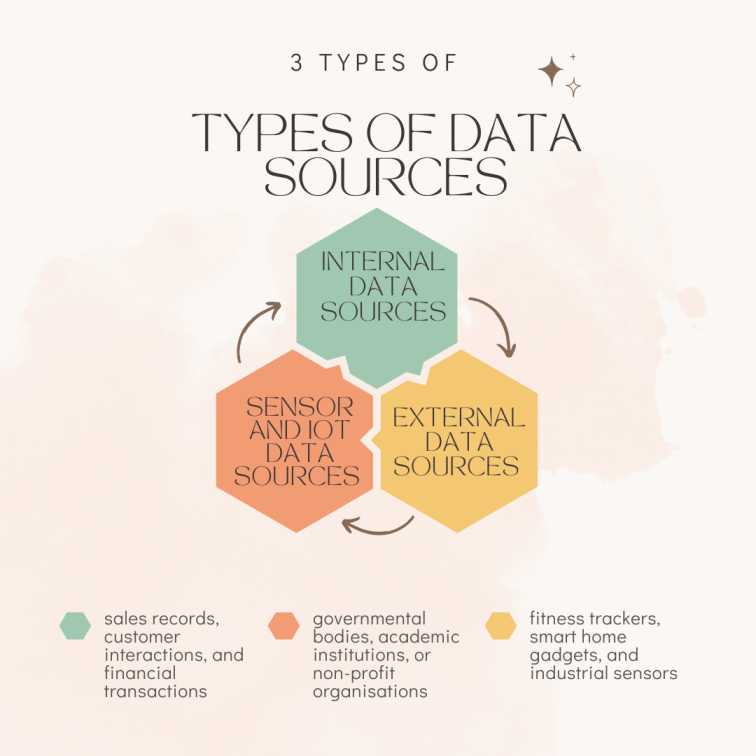
Types of Data Sources

Types of Data Sources

The different locations or points of origin from which data might be gathered or received are referred to as data sources. These sources can be roughly divided into many groups according to their nature and traits. Here are a few typical categories of data sources:

Internal Data Sources

  • Data is generated through regular business operations, such as sales records, customer interactions, and financial transactions.
  • Customer data is information gathered from user profiles, reviews, and online and mobile behaviours.
  • Information about employees, such as their work history, attendance patterns, and training logs.

External Data Sources 

  • Publicly available data that may be accessed by anyone, is frequently offered by governmental bodies, academic institutions, or non-profit organisations.
  • Companies that supply specialised datasets for certain markets or uses, such as market research data, demographic data, or weather data. 
  • Information gathered from different social media sites includes user interactions, remarks, and trends.

Sensor and IoT Data Sources 

  • Information is gathered by sensors and connected devices, including wearable fitness trackers, smart home gadgets, and industrial sensors.
  • Information is collected by weather stations, air quality monitors, and other environmental sensors that keep tabs on several characteristics.

Data Preprocessing and Data Cleaning

Data Cleaning Techniques

A dataset’s flaws, inconsistencies, and inaccuracies are found and fixed through the process of data cleaning, sometimes referred to as data cleansing or data scrubbing. Making sure that the data utilised for analysis or decision-making is correct and dependable is an essential stage in the data preparation process. Here are a few typical methods for cleaning data:

Handling Missing Data 

  • Imputation: Substituting approximated or forecasted values for missing data using statistical techniques like mean, median, or regression.
  • Removal: If it doesn’t negatively affect the analysis, remove rows or columns with a substantial amount of missing data.

Removing Duplicates 

  • Locating and eliminating duplicate records to prevent analysis bias or double counting.

Outlier Detection and Treatment 

  • Help identify the outliners and make an informed decision as required in the data analysis. 

Data Standardisations 

  • Ensures consistent units of measurement, representation and formatting across the data sets. 

Data Transformation

  • Converting data for a feasible form to perform data analysis to ensure accuracy. 

Data Integration and ETL (Extract, Transform, Load)

Data Integration 

Data integration involves multiple data being combined in a unified manner. This is a crucial process in an organisation where data is stored in different databases and formats which need to be brought together for analysis. Data integration aims to remove data silos ensuring efficient decision-making with data consistency. 

ETL (Extract, Transform, Load) 

Data extraction from diverse sources, format conversion, and loading into a target system, like a data warehouse or database, are all steps in the data integration process known as ETL. ETL is a crucial step in ensuring data consistency and quality throughout the integrated data. The three stages of ETL are

  • Extract: Data extraction from various source systems, which may involve reading files, running queries against databases, web scraping, or connecting to APIs. 
  • Transform: Putting the collected data into a format that is consistent and standardised. Among other processes, this step involves data cleansing, data validation, data enrichment, and data aggregation.
  • Load: Transformed data is loaded into the target data repository, such as a database or data warehouse, to prepare it for analysis or reporting. 

Exploratory Data Analysis (EDA)

Understanding EDA and its Importance

Exploratory data analysis, often known as EDA, is a key first stage in data analysis that entails visually and quantitatively examining a dataset to comprehend its structure, trends, and properties. It seeks to collect knowledge, recognise trends, spot abnormalities, and provide guidance for additional data processing or modelling stages. Before creating formal statistical models or drawing conclusions, EDA is carried out to help analysts understand the nature of the data and make better decisions.

Data Visualisation Techniques

Data visualisation techniques are graphically represented to visually explore, analyse and communicate various data patterns and insights. It also enhances the comprehension of complex datasets and facilitates proper data-driven decision-making. The common data visualisation techniques are 

  • Bar graphs and column graphs. 
  • Line charts. 
  • Pie charts. 
  • Scatter plots. 
  • Area charts. 
  • Histogram. 
  • Heatmaps. 
  • Bubble charts. 
  • Box plots. 
  • Treemaps. 
  • Word clouds. 
  • Network graphs. 
  • Choropleth maps. 
  • Gantt charts. 
  • Sankey diagrams. 
  • Parallel Coordinates. 
  • Radar charts. 
  • Streamgraphs. 
  • Polarcharts. 
  • 3D charts. 

Descriptive Statistics and Data Distribution

Descriptive Statistics 

Descriptive statistics uses numerical measures to describe the various datasets succinctly. They help in providing a summary of data distribution and help to understand the key properties of data without conducting a complex analysis. 

Data Distribution

The term “data distribution” describes how data is split up or distributed among various values in a dataset. For choosing the best statistical approaches and drawing reliable conclusions, it is essential to comprehend the distribution of the data. 

Identifying Patterns and Relationships in Data

An essential part of data analysis and machine learning is finding patterns and relationships in data. You can gather insightful knowledge, form predictions, and comprehend the underlying structures of the data by seeing these patterns and linkages. Here are some popular methods and procedures to help you find patterns and connections in your data:

Start by using plots and charts to visually explore your data. Scatter plots, line charts, bar charts, histograms, and box plots are a few common visualisation methods. Trends, clusters, outliers, and potential correlations between variables can all be seen in visualisations.

To determine the relationships between the various variables in your dataset, compute correlations. When comparing continuous variables, correlation coefficients like Pearson’s correlation can show the strength and direction of associations.

Use tools like clustering to find patterns or natural groupings in your data. Structures in the data can be found using algorithms like k-means, hierarchical clustering, or density-based clustering.

Analysing high-dimensional data can be challenging. You may visualise and investigate correlations in lower-dimensional areas using dimensionality reduction techniques like Principal Component Analysis (PCA) or t-distributed Stochastic Neighbour Embedding (t-SNE).

Data Modeling, Data Engineering, and Machine Learning

Introduction to Data Modeling

The technique of data modelling is essential in the area of information systems and data management. To enable better comprehension, organisation, and manipulation of the data, it entails developing a conceptual representation of the data and its relationships. Making informed business decisions, creating software applications, and designing databases all require data modelling. 

Data modelling is a vital procedure that aids organisations in efficiently structuring their data. It helps with the creation of effective software programmes, the design of strong databases, and the maintenance of data consistency across systems. The basis for reliable data analysis, reporting, and well-informed corporate decision-making is a well-designed data model.

Data Engineering and Data Pipelines

Data Engineering 

Data engineering is the process of building and maintaining the infrastructure to handle large volumes of data efficiently. It involves various tasks adhering to data processing and storage. Data engineers focus on creating a reliable architecture to support data-driven applications and analytics. 

Data Pipelines

Data pipelines are a series of automated procedures that move and transform data from one stage to another. They provide a structured flow of data that enables data processing and delivery in various destinations easily. Data pipelines are considered to be the backbone of data engineering that helps ensure a smooth and consistent data flow. 

Machine Learning Algorithms and Techniques

In data-driven decision-making automation, machine learning algorithms and techniques are extremely crucial. They allow computers to learn various patterns and make predictions without any explicit programming. Here are some common machine-learning techniques. They are: 

  • Linear Regression: This is used for predicting continuous numerical values based upon its input features. 
  • Logistic Regression: This is primarily used for binary classification problems that predict the probabilities of class membership. 
  • Hierarchical Clustering: Agglomerative or divisive clustering based upon various hierarchical relationships. 
  • Q-Learning: A model-free reinforcement learning algorithm that estimates the value of taking particular actions in a given state. 
  • Transfer Learning: Leverages knowledge from one task or domain to improve performances on related tasks and domains. 

Big Data and Distributed Computing

Introduction to Big Data and its Challenges

Big Data is the term used to describe enormous amounts of data that are too complex and huge for conventional data processing methods to effectively handle. The three Vs—Volume (a lot of data), Velocity (fast data processing), and Variety (a range of data types—structured, semi-structured, and unstructured)—define it. Data from a variety of sources, including social media, sensors, online transactions, videos, photos, and more, is included in big data.

Distributed Computing and Hadoop Ecosystem

Distributed Computing 

A collection of computers that work together to complete a given activity or analyse huge datasets is known as distributed computing. It enables the division of large jobs into smaller ones that may be done simultaneously, cutting down on the total computing time.

Hadoop Ecosystem 

Hadoop Ecosystem is a group of free and open-source software programmes that were created to make distributed data processing and storage easier. It revolves around the Apache Hadoop project, which offers the Hadoop Distributed File System (HDFS) and the MapReduce framework for distributed processing.

Natural Language Processing (NLP) and Text Analytics

Processing and Analysing Textual Data

Natural language processing (NLP) and data science both frequently use textual data for processing and analysis. Textual information can be available is available blog entries, emails, social network updates etc. There are many tools, libraries, and methodologies available for processing and deriving insights from text in the rich and developing field of textual data analysis. It is essential to many applications, such as sentiment analysis, consumer feedback analysis, recommendation systems, chatbots, and more.

Sentiment Analysis and Named Entity Recognition (NER)

Sentiment Analysis 

Finding the sentiment or emotion expressed in a text is a method known as sentiment analysis, commonly referred to as opinion mining. It entails determining if a good, negative, or neutral attitude is being expressed by the text. Numerous applications, including customer feedback analysis, social media monitoring, brand reputation management, and market research, heavily rely on sentiment analysis.

Named Entity Recognition (NER) 

Named Entity Recognition (NER) is a subtask of information extraction that involves the identification and classification of specific entities such as the names of people, organisations, locations, dates, etc. from pieces of text. NER is crucial for understanding the structure and content of text and plays a vital role in various applications, such as information retrieval, question-answering systems, and knowledge graph construction.

Topic Modeling and Text Clustering

Topic Modelling 

To find abstract “topics” or themes in a group of papers, a statistical technique is called topic modelling. Without a prior understanding of the individual issues, it enables us to comprehend the main topics or concepts covered in the text corpus. The Latent Dirichlet Allocation (LDA) algorithm is one of the most frequently used methods for topic modelling.

Text Clustering 

Based on their content, comparable papers are grouped using a technique called text clustering. Without having any prior knowledge of the precise categories, it seeks to identify organic groups of documents. Large datasets can be organised and their patterns can be found with the aid of clustering.

Time Series Analysis and Forecasting

Understanding Time Series Data

Each data point in a time series is connected to a particular timestamp and is recorded throughout a series of periods. Numerous disciplines, such as economics, weather forecasting, and IoT (Internet of Things) sensors, use time series data. Understanding time series data is crucial for gaining insightful knowledge and for developing forecasts on temporal trends.

Time Series Visualisation and Decomposition

Understanding the patterns and components of time series data requires the use of time series visualisation and decomposition techniques. They aid in exposing trends, seasonality, and other underlying structures that can help with data-driven decision-making and value forecasting in the future.

Moving averages, exponential smoothing, and sophisticated statistical models like STL (Seasonal and Trend decomposition using Loess) are just a few of the strategies that can be used to complete the decomposition process.

Analysts can improve forecasting, and decision-making by visualising data to reveal hidden patterns and structures. These methods are essential for time series analysis in economics, healthcare, finance, and environmental studies.

Forecasting Techniques (ARIMA, Exponential Smoothing, etc.)

To forecast future values based on historical data and patterns, forecasting techniques are critical in time series analysis. Here are a few frequently used forecasting methods:

  1. Autoregressive Integrated Moving Average (ARIMA): This time series forecasting technique is well-liked and effective. To model the underlying patterns in the data, it mixes moving averages (MA), differencing (I), and autoregression (AR). ARIMA works well with stationary time series data, where the mean and variance don’t change over the course of the data.
  2. Seasonal Autoregressive Integrated Moving Average (SARIMA): An expansion of ARIMA that takes the data’s seasonality into consideration. In order to deal with the periodic patterns shown in the time series, it also contains additional seasonal components.
  3. Exponential smoothing: A family of forecasting techniques that gives more weight to new data points and less weight to older data points is known as exponential smoothing. It is appropriate for time series data with seasonality and trends. 
  4. Time series decomposition by season (STL): Time series data can be broken down into their trend, seasonality, and residual (noise) components using the reliable STL approach. When dealing with complicated and irregular seasons, it is especially helpful.

Real-World Time Series Analysis Examples

Finance: The process of predicting the future, spotting patterns, and supporting investment decisions by analysing stock market data, currency exchange rates, commodity prices, and other financial indicators.

Energy: Planning for peak demand, identifying energy-saving options, and optimising energy usage all require analysis of consumption trends.

Social Media: Examining social media data to evaluate company reputation, spot patterns, and comprehend consumer attitude.

Data Visualisation and Interactive Dashboards

Importance of Data Visualisation in Data Science

For several reasons, data visualisation is essential to data science. It is a crucial tool for uncovering and sharing intricate patterns, trends, and insights from huge datasets. The following are some of the main justifications for why data visualisation is so crucial in data science:

  • Data visualisation enables data scientists to visually explore the data, that might not be visible in the raw data.
  • It is simpler to spot significant ideas and patterns in visual representations of data than in tabular or numerical forms. When data is visualised, patterns and trends are easier to spot.
  • Visualisations are effective tools for explaining difficult information to stakeholders of all technical backgrounds. Long reports or tables of figures cannot express insights and findings as clearly and succinctly as a well-designed visualisation.

Visualisation Tools and Libraries

For making intelligent and aesthetically pleasing visualisations, there are several potent tools and packages for data visualisation. Among the well-liked ones are:

  • A popular Python charting library is Matplotlib. It provides a versatile and extensive collection of features to build all kinds of static, interactive, and publication-quality visualisations.
  • Seaborn, a higher-level interface for producing illuminating statistical visuals, is developed on top of Matplotlib. It is very helpful for making appealing visualisations with little coding and for visualising statistical correlations.
  • Tableau is an effective application for data visualisation that provides interactive drag-and-drop capability to build engaging visualisations. It is widely used in many industries for data exploration and reporting.

Interactive Dashboards and Custom Visualisations

Interactive Dashboards

Users can interact with data visualisations and examine data via interactive dashboards, which include dynamic user interfaces. They often include numerous graphs, tables, charts, and filters to give a thorough overview of the data

Custom Visualisation

Data visualisations that are developed specifically for a given data analysis purpose or to present complex information in a more understandable way are referred to as custom visualisations. Custom visualisations are made to fit particular data properties and the targeted objectives of the data study.

Communicating Data Insights through Visuals

A key competency in data analysis and data science is the ability to convey data insights through visualisations. It is simpler for the audience to act on the insights when complicated information is presented clearly through the use of well-designed data visualisations.  In a variety of fields, such as business, research, and academia, effective data visualisations can result in better decision-making, increased understanding of trends, and improved findings.

Data Ethics, Privacy, and Security

Ethical Considerations in Data Science

To ensure ethical and socially acceptable usage of data, data science ethics are essential. It is critical to address ethical issues and ramifications as data science develops and becomes increasingly important in many facets of society. 

The ethical development of data science is essential for its responsible and long-term sustainability. Professionals may leverage the power of data while preserving individual rights and the well-being of society by being aware of ethical concepts and incorporating them into every step of the data science process. A constant exchange of ideas and cooperation among data scientists, ethicists, decision-makers, and the general public is also essential for resolving new ethical issues in data science. 

Data Privacy Regulations (e.g., GDPR)

A comprehensive data protection law known as GDPR went into force in the European Union (EU) on May 25, 2018. Regardless of where personal data processing occurs, it is governed by this law, which applies to all EU member states. People have several rights under GDPR, including the right to view, correct, and delete their data. To secure personal data, it also mandates that organisations get explicit consent and put in place strong security measures.

Organisations that gather and use personal data must take these restrictions into account. They mandate that businesses disclose their data practises in full, seek consent when it’s required, and put in place the essential security safeguards to safeguard individuals’ data. Organisations may incur hefty fines and reputational harm for failing to abide by data privacy laws. More nations and regions are enacting their own data protection laws to defend people’s rights to privacy as concerns about data privacy continue to rise.

Data Security and Confidentiality

Protecting sensitive information and making sure that data is secure from unauthorised access, disclosure, or alteration require strong data security and confidentiality measures. Data security and confidentiality must be actively protected, both by organisations and by individuals.

It takes regular monitoring, updates, and enhancements to maintain data security and secrecy. Organisations may safeguard sensitive information and preserve the confidence of their stakeholders and consumers by implementing a comprehensive strategy for data security and adhering to best practices.

Fairness and Bias in Machine Learning Models

Fairness and bias in machine learning models are essential factors to take into account to make sure that algorithms don’t act biasedly or discriminate against specific groups. To encourage the ethical and responsible use of machine learning in many applications, it is crucial to construct fair and unbiased models.

Building trustworthy and ethical machine learning systems requires taking into account fairness and prejudice. It is crucial to be aware of the ethical implications and work towards just and impartial AI solutions as AI technologies continue to be incorporated into a variety of fields.

Conclusion

To sum up, data science and analytics have become potent disciplines that take advantage of the power of data to provide insights, guide decisions, and bring about transformational change in a variety of industries. For businesses looking to gain a competitive advantage and improve efficiency, data science integration into business operations has become crucial.

If you are interested in looking for a data analyst course or data scientist course with placement, check out Imarticus Learning’s Postgraduate Programme in Data Science and Analytics. This data science course will help you get placed in one of the top companies in the country. These data analytics certification courses are the pinnacle of building a new career in data science. 

To know more or look for more business analytics course with placement, check out the website right away!

Take Advantage of This Once-In-A-Lifetime Opportunity To Express Your Ideas And Win Fantastic Prizes.

Are you a Data science blogger? Imarticus Data Science is proud to announce our Data Science Blogging contest. This contest will reward the best Data Science blog posts of 2021 with fantastic prizes with up to 10,000 gifts vouchers.  

Do you feel like you have many insightful thoughts to share as a blog on Data Science & Analytics? If you enjoy writing about data science, there is a once-in-a-lifetime opportunity to put your ideas in front of countrywide audiences. And the best blog post author stands to win a prize for their work!

data science and analytics blogging contestShare your blog on any of the following topics: 

  • Data science
  • Data Analytics
  • Machine Learning
  • Data Engineering
  • Deep Learning
  • Computer Vision
  • Python Programming and many more related to Data Analytics topics. 

 The Criteria to Participate in Data science Blogging contest

  • All blogs should be 500 to 1000 words in length.
  • The content must be original, well-researched, plagiarism-free, and informative.
  • Do not entertain duplicate posts.
  • The deadline is August 31st, 2021, at 11:59 pm IST.
  • The number of article contributors is restricted to three members.
  • blog.imarticus.org will host all the articles with credit given to the contributor(s). Blog entries are considered Imarticus Learning intellectual property from this point onward.

 How to enter in the Data science Blogging contest and the process

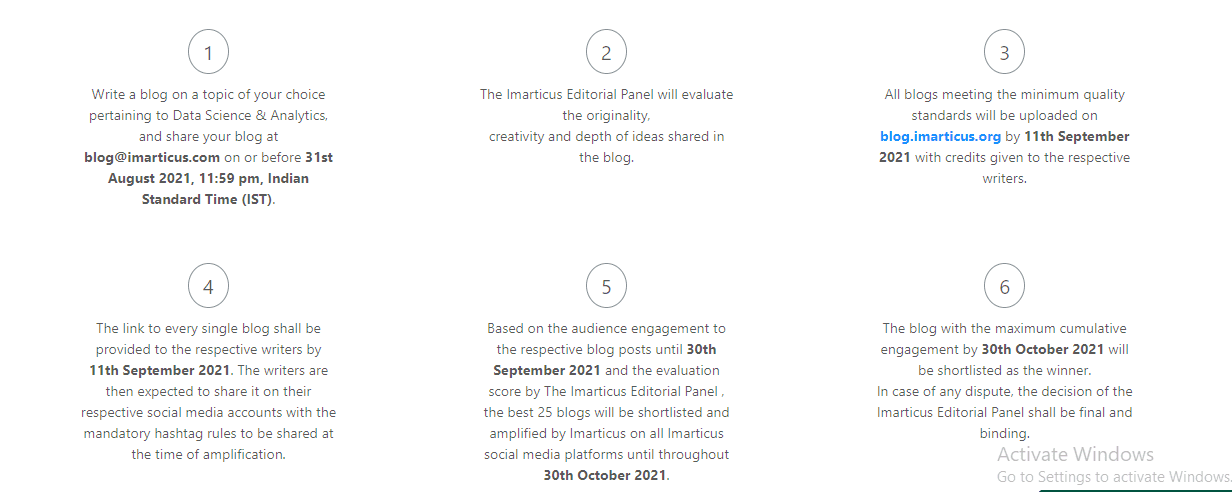
  1. Write a blog on a topic of your choice pertaining the data science and analytics. After completion, share your blog at blog@imarticus.com on or before August 31st, 2021, 11:59 pm, Indian Standard Time (IST).
  2. The originality, creativity, and level of depth in all blog articles.
  3. The content should meet the minimum criteria explained above and be submitted before the given deadline.
  4. Will upload all the eligible blogs on or before September 11th, 2021.
  5. The writers will receive the respective blog links by September 11th, 2021. The individual should share the blog link on their social channels with mandatory hashtag rules.
  6. Imarticus team will evaluate the engagement on the individual blog posts until September 30th, 2021. The Imarticus panel team will shortlist the best 25 blogs and promotes them on their social channels until October 30th, 2021.
  7. The blog that receives the most engagement by October 30th, 2021, is shortlisted as the winner. Imarticus Editorial Panel’s decision is final and binding in case of any dispute.data science and analytics blogging contest

 Why should you participate in the Imarticus Blogger of Year Contest?

  1. Imarticus Social recognizes your skill and is eager to help promote your blog.
  2. Exiting winning amount to motivate and encourage your effort.
  3. The winner details will get necessary coverage within the media promoted and supported by Imarticus Learning.
  4. We will promote the interview of the top 25 selected bloggers on different social channels of Imarticus Learning. 

Apart from the 10,000 gift voucher to the winner, Imarticus Learning will give prizes to the other participants. The details are as follows:

  • Winner: 10,000
  • Runner Up: 7,500
  • 3rd Place: 5,000
  • 4th to 10th Position: 2,000
  • 11th to 20th Position: Imarticus Hall of Fame Entrydata science and analytics blogging contest

T&C Apply.
Imarticus Learning shall own the Intellectual Rights of the blog content shared with us at blog@imarticus.com with due credits to the writer(s) till perpetuity. Imarticus Learning reserves all the rights to use, publish or remove the content on all our platforms.

The decision of the Imarticus Editorial Panel shall be final and binding in all matters. Any dispute will fall under the jurisdiction of Mumbai. The winners will receive Gift Vouchers.
To know more – Click here 

Conclusion: 

If you are interested in data science and want to share your ideas with the world, then this is a once-in-a-lifetime opportunity. Entering our #ImarticusBlogLikeAPro Season 1 Championship Award along with a cash prize of INR 10,000/ will not only is fun, but it could also win you fantastic prizes! Professional tone required for submission.

How Do You Know If You Are Qualified To Be A Business Analyst?

Are you thinking of exploring a career in business analysis? Do you usually wind up thinking about whether your aptitude and experience are significant for a business analyst position? How will you be able to decide whether you can qualify and fit the bill so as to be a business analyst?
We frequently don’t perceive what can be clear to other individuals or even what other individuals expect we ought to clearly be seeing.
Accordingly, usually all of our response to the question, “Am I able to fit the bill to be a business analyst?” is a reverberating “no” when it ought to be a “yes” or if nothing else a “probably”.
Transferable qualifications in the field of business analysis are abilities that you’ve worked through the experiences in your past positions. With regards to business analysis, transferable qualifications or skills are BA strategies you’ve utilized as a part of non-BA positions or expert abilities you’ve created in maybe random positions like internships.
Transferable skills can enable you to skip past entry level business analyst positions. This is particularly vital on the grounds that they have a tendency to very few entry level business analyst positions.
In the event that you do have even a couple of years of expert experience, and a decent lot of motivations to end up plainly as a business analyst and you also happen to have the required transferable skills. It is a good decision to try and change your career path and start exploring the career opportunities in business analysis.
When changing to business analysis, there are numerous position levels in which you can search for your business analyst capabilities. A decent initial step is to survey a list of core business analyst skills that are vital for another business analyst and to begin mapping your experience to these analyst positions.

Here’s a summary of what you can hope to discover amid this procedure

The core business analyst aptitudes, those you may discover mapped out in the Business Analysis Body of Knowledge® (BABOK®), will enable you to move beyond the screening procedure for a business analyst position. Any given employer has a tendency to have an agenda of key capabilities they totally need to have met by a potential applicant. What’s more, regardless of the possibility that your experience is casual, it’s conceivable that you can outline to a more formal deliverable or examination strategy. Utilize the BA experience (suitable) in your resume and in a prospective employee meeting and you’ll build your odds of qualifying yourself for a business examiner part.
In spite of the fact that the employer’s screen for a particular arrangement of core business analyst skills, they frequently look for expert industry endorsed skills, for example, relationship-building and the capacity to speak with a variety of partners from the business and specialized groups.
Understanding the key skills you must bring to the table is basic. Having the capacity to address particular encounters where you utilized those skills in a BA setting (or near BA setting) can build the quantity of BA positions you’ll meet all requirements for.
Apart from getting a clear understanding, there also a few professional training courses for business analysis, that many professionals can opt for. We at Imarticus Learning offers business analyst training programs in both classroom and online mode, which help aspirants for jump-starting their career in the field of business analysis.